INSTALL A WORDPRESS PLUGIN
Just like we checked how to install a WordPress theme, the same way we can install a WordPress plugin.
WordPress plugins make our work so much easier. Especially if you are a non-techie or do not want to involve yourself with too many back-end codings then a plugin is the solution.
If you check the post about how to increase website speed then you will get to know that 90% of the time there are plugins to handle our codings for the htaccess files.
Unlike a WordPress theme, we require quite a handful of plugins to run our blog smoothly.
Some of the very useful free WordPress plugins which I find are:
- Yoast SEO- Where you can add your focus keyword and see the overall SEO health of the post and edit your meta description.
- Autoptimize- A simple and effective optimizing plugin to minify your CSS, JS files, and images.
- W3 total cache or any other caching plugin- W3 cache dramatically improves my site’s performance and site speed. WP super cache is also good enough. You need to check which one is working for your site.
- Google Analytics: Once you start blogging you will automatically fall into the trap of checking your website visitors :). Google Analytics is even necessary to understand your audience.
Check out the Google Analytics training for beginners to understand your visitors and demographics.
INSTALL A WORDPRESS PLUGIN FROM DASHBOARD
You can easily search and install any plugin from the WordPress dashboard.
Go to WordPress Dashboard> Plugins> Add new

Search Plugins

Click on the Install of any plugin which you want to install.

Before installing I always check for the details by clicking on ‘More Details’.
Especially to check the descriptions and reviews.
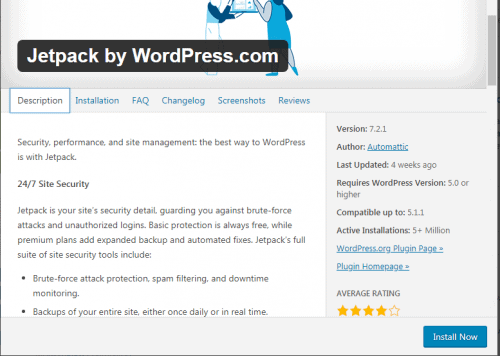
After Installing> Activate

After activation, some plugins are ready to be used while others need some added setups as instructed.
INSTALLING A WORDPRESS PLUGIN DOWNLOADED FROM A DIFFERENT SITE
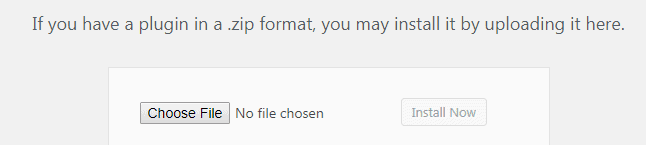
If you are downloading a plugin from WordPress/plugins or any other 3rd party site then choose plugin> add new> upload

Click on Choose File and select your downloaded folder and install.
Installing a WordPress plugin is very similar to installing WordPress themes.
Delete the unused plugins to avoid overcrowding the WordPress database.
Binge On:
- 7 Blogging Resources to Help Beginner Bloggers with
- How to get THINGS DONE as a Blogger?
- How to Instal WordPress on Sitground in just 10 Mins